Copilot gets a unified home — and two new capabilities
Microsoft announced Copilot Wave 4 on September 25, 2026. The update does three distinct things: it replaces the existing Chat and Co-work toggle navigation with a unified Home experience, adds a new Code capability for app and automation building, and replaces the Scout agent experience with a full Autopilots feature. Each one shifts how users interact with Copilot and how admins govern consumption costs.
What follows is based on a detailed video walkthrough and commentary by a Microsoft 365 Copilot practitioner reviewing the Wave 4 announcement. Feature names, UI labels, and rollout stages all reflect that commentary. Verify specifics against the official Microsoft announcement before acting on them in your environment.
Why the navigation changed
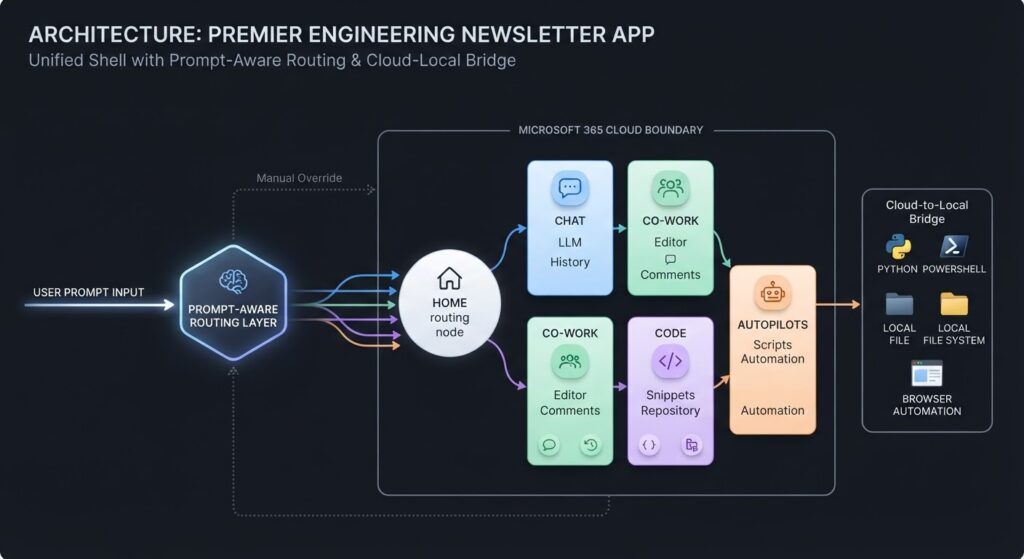
The old Chat/Co-work toggle created friction. Customers reported confusion about which mode to use for a given task. Microsoft’s answer is prompt-based smart routing: you type a prompt, and Copilot determines whether it belongs in a chat context or a Co-work context. An explicit toggle remains available if you want to override that decision, but the default experience removes the choice from the user entirely.
The broader intent is to position Copilot as a single surface where chat, collaborative work, code execution, and background automation all live together. Separate toggles worked against that goal.
Who it affects
Three groups feel this most immediately. End users lose the toggle and gain the Home menu, Code, and Autopilots — the net experience is broader, but the navigation changes. Developers and power users who previously worked with Scout will find that experience replaced by Autopilots, which now runs inside the full desktop application. Administrators and FinOps stakeholders face the most time-sensitive decisions: Code and Autopilots both consume Copilot credits, and spend policy controls are rolling out in parallel.
Concrete capabilities — and their limits
Home merges Chat and Co-work into one entry point. Smart routing handles mode selection by default. An explicit toggle remains available for users who need it.
Code is a new natural-language interface for building apps, dashboards, and automations. According to the commentary, all projects are stored inside a Microsoft Copilot managed runtime — described as new hosting infrastructure that keeps code artifacts within your Microsoft 365 environment, governed by existing Purview policies, enterprise data commitments, and responsible AI commitments. Code is entering the Frontier program, meaning access is limited to Frontier participants at this stage. It is not generally available.
Autopilots is the successor to Scout. It adds local device access — Python execution, PowerShell, local file services, browser automation — alongside the cloud-based automations already available in Co-work. Scheduled tasks appear in the new UI under a label the commentary describes as “routines.” A named assistant persona called Dot can be injected into Teams chats and emails, functioning like a people entry inside Microsoft 365. Autopilots is entering private preview in Copilot and Teams for chat-based experiences. It is not yet broadly available.
One limit worth naming: Co-work has always been cloud-only. Autopilots adds local device access, but that combination is new and untested at scale. Organisations running strict endpoint security policies should evaluate what local execution access means for their environments before enabling it.
The commentary also references a proactive feature called Today — described as an aggregated daily briefing drawing on your work data, with calendar context. No availability date was given. Treat this as directional, not a commitment.
@mentioning Copilot directly inside Teams chat — like tagging a colleague — is also entering private preview in Teams. The commentary notes this is expected by end of September 2026, though that timeline is not confirmed in the primary announcement.
Spend policies: the admin priority right now
Code, Autopilots, and Co-work all consume Copilot credits. A Cost Management Center and FinOps section already exist in the admin experience. Wave 4 adds spend policy controls: model selection controls, better usage insights, API access governance, and a credit request routing workflow that can connect to external approval systems such as ServiceNow.
Additional spend policy capabilities are expected around Microsoft Ignite. The commentary cites November 2026 as the approximate timeframe, but exact timelines are not confirmed in the primary announcement. Watch the Microsoft 365 Message Center for rollout specifics.
The practical risk is direct. Deploy Code or Autopilots broadly before spend policies are configured, and consumption can outpace budget. Set policies before you expand access, not after.
How to access Wave 4 features
The Home UI change rolls out to the desktop application in the weeks following the announcement. No separate action is required — it replaces the existing toggle navigation automatically.
Code access requires Frontier program enrollment. If your organisation is not already in Frontier, that is the prerequisite step.
Autopilots private preview requires sign-up through Microsoft. Monitor the official blog and Message Center for the private preview nomination process.
For @mention Copilot in Teams, check your Teams admin center for eligibility once private preview opens.
Existing licenses carry forward. The announcement does not describe new SKUs. Consumption experiences — Co-work, Code, Autopilots — sit on top of existing credits. Your current entitlement determines how much headroom you have.
The counterpoint worth taking seriously
Unifying Chat, Co-work, Code, and Autopilots into one surface reduces navigation steps for power users. But it also means users who only needed basic chat now land in an interface that offers code execution and background automation. Adoption friction typically increases when an interface adds capabilities faster than training and change management can absorb them.
If your organisation is still driving baseline Copilot adoption, enabling Home first and holding Code and Autopilots for a later phase is likely the more defensible path. Code and Autopilots remain in Frontier and private preview respectively, so broad access is not immediate — but governance decisions made now will be easier to enforce than ones made under pressure after general availability.
One action this week: Review your current Copilot credit consumption baseline in the Cost Management Center, then configure spend policies for Code and Autopilots before either feature reaches your users — even while access remains limited to preview. Setting the ceiling before the feature arrives is substantially easier than walking it back after adoption has started.
— Eagentix
Eagentix helps growth-focused enterprises redesign and automate manual business processes. We combine executive strategy, implementation support, and managed services to build dependable operations across Southeast Asia.
Eagentix helps growth-focused enterprises redesign and automate manual business processes. We combine executive strategy, implementation support, and managed services to build dependable operations across Southeast Asia.